Head-Tracking Monitor Arm
Overview
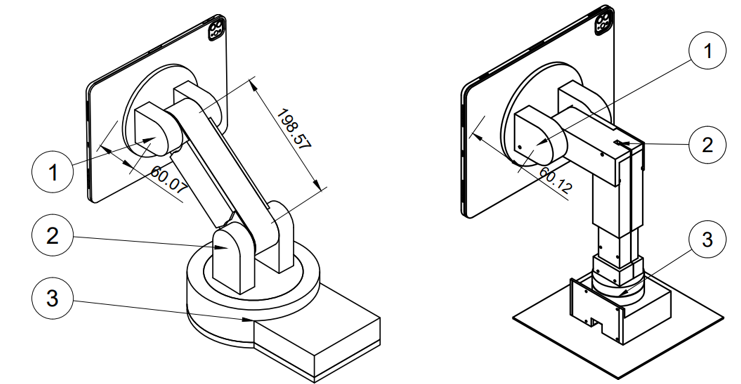
A comprehensive 3rd year project building a monitor arm that tracks head position in real-time and adjusts the display angle automatically. Uses Haar cascade face detection via OpenCV on a Raspberry Pi 5 with MJPEG camera streaming. The mechanical design explores two joint configurations: RRR (three revolute) and RPR (revolute-prismatic-revolute), with full CAD in Fusion 360. Features hardware PWM servo control at 400Hz with dead-band filtering and rate-limited updates.
Key Highlights
Gallery
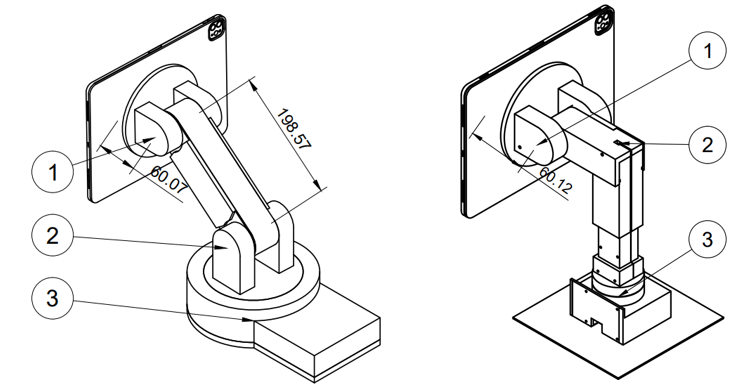
Compared two joint configurations: RRR (3 revolute) vs RPR (revolute-prismatic-revolute) for optimal workspace reach
3D CAD Model
RPR Monitor Arm — Fusion 360 CAD — drag to rotate, auto-rotates when idle.
Deep Dive
The Problem
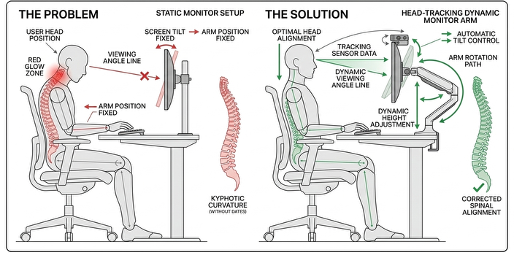
Despite extraordinary advances in display technology, the monitor stand has remained fundamentally unchanged for decades. Why is the monitor arm still just a static piece of metal when our devices are incredibly smart? The prevalence of tech neck (kyphotic cervical curvature) has risen from 4.5% in 2006 to 16.7% in 2018 — primarily caused by screens positioned too low or at poor angles. This system acts like a human cameraman: it tracks the user's face via computer vision and rotates the screen to maintain optimal viewing angle automatically.
Real-World Use Case
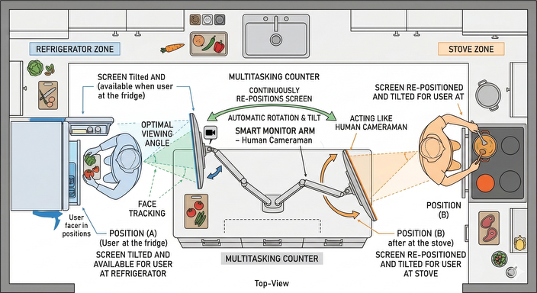
Modern home environments involve constant multitasking — cooking, childcare, moving between workstations. When a user's hands are occupied, adjusting a static monitor is impossible. The arm tracks the user's face and re-positions the screen automatically as they move around the kitchen or workspace.
Mechanical Design — RRR vs RPR
Two kinematic configurations were evaluated. The RRR (three revolute joints) offers greater workspace freedom but the gravitational holding torque is enormous: τ = 116.77 kg·cm. This forces servos to fight gravity continuously, causing overheating and jitter. The RPR design was selected instead — a vertical lead-screw (Prismatic joint) for elevation, followed by two rotational joints for Pan and Tilt. The lead screw is self-locking, holding position without consuming holding current. Tilt torque: τ_total = 0.839 Nm (8.56 kg·cm). Pan torque: 0.145 Nm (1.5 kg·cm). The DFRobot SER0067 (35 kg·cm) servo was selected for a 37% safety margin over the required load.
CAD & Hardware Features
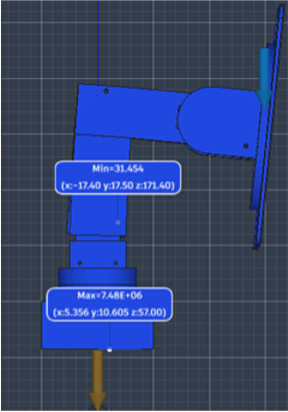
Designed entirely in Fusion 360 with internal cable routing channels for a clean exterior, slide-on covers for easy servo access and replacement, guidelines for accurate servo positioning, and magnetic strip layers on the head for quick monitor attachment and detachment. FEA static stress simulation prior to 3D printing confirmed a minimum Safety Factor of 31.45 — high intentionally because geometric bulk needed for rigidity naturally produces low stress concentrations.
Software Pipeline — MJPEG Server
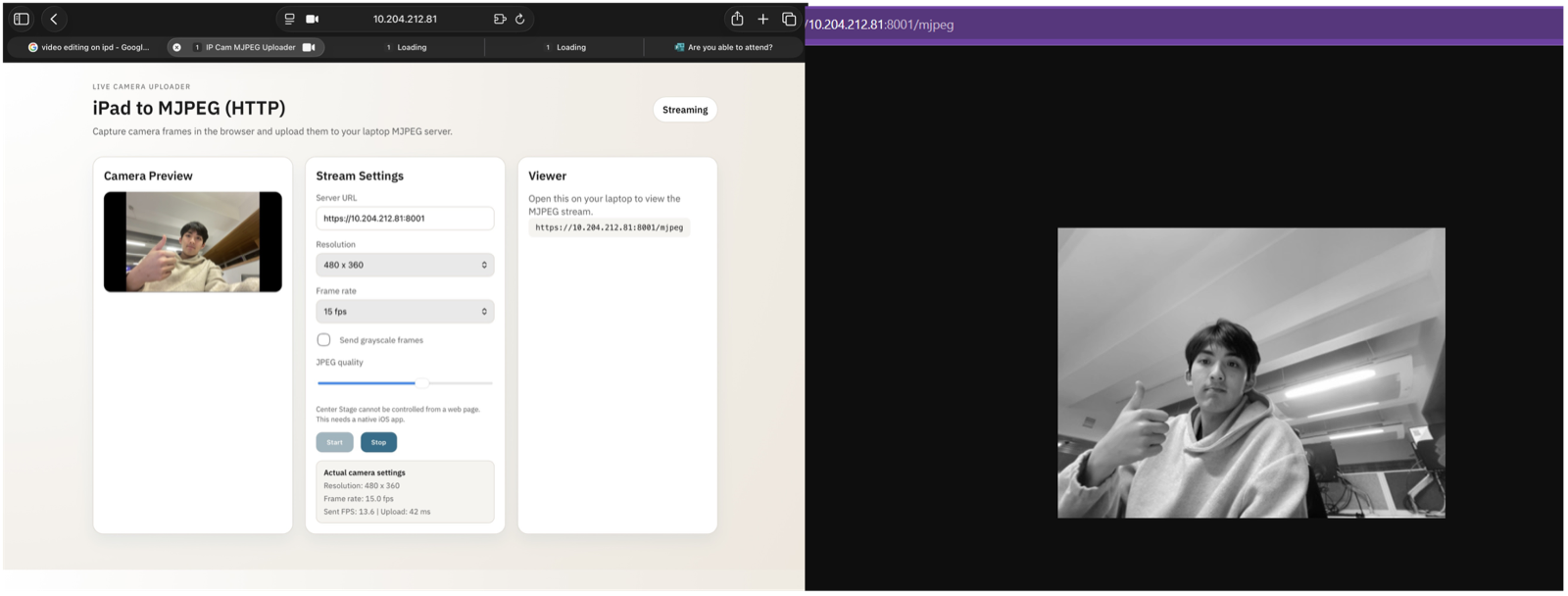
The software runs on a Raspberry Pi 5 in four modules. Module 1: A lightweight Flask MJPEG server streams live video from the iPad camera at 480x360 resolution and 15fps. This custom server was necessary to bypass Apple's Center Stage feature, which artificially pans and zooms the feed — ruining the math for mechanical tracking. The server runs at just 2.9% CPU and 40MB memory, making it viable as a standalone module.
Face Detection & Recognition
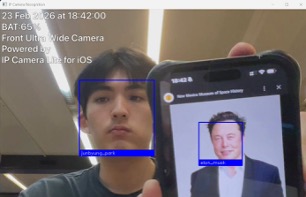
Module 2: OpenCV Haar cascade face detection with scaleFactor 1.1, minNeighbors 5, and minSize 60x60 px. Module 3: Hardware PWM servo control at 400Hz with 0.5% duty cycle steps at 100ms intervals for jitter-free motion and a 15% dead-band filter. Module 4: Face recognition using dlib identifies who is in front of the monitor — trained on a custom dataset. The end goal: the arm loads personalised height and angle presets the moment it recognises the specific user sitting down.
Interactive Lab
3D Monitor Arm — Aim at the head!
Control the RPR arm in 3D: first R is Yaw (horizontal pan), P is Height (vertical extension), last R is Pitch (monitor tilt). Match the real servo control from the Raspberry Pi 5 project!